

After all of your hard work setting up sessions, taking photos, and editing them, it’s always so satisfying knowing that everything is uploaded and ready to go. But before I hit send, there’s one part of the client experience that I know deserves some attention: the photography gallery itself.
Picture what happens on the receiving end of that email. Your client opens the link and gets to see their finished photos for the first time. They might be sending the link to grandparents, picking their favorites, or deciding which image gets made into a canvas or put up on the wall.
I ultimately want that experience to feel easy.
This is one of the reasons that I love using Pixieset. I love its clean look, and how straightforward it is for photographers to deliver their images. It also makes selling prints and products to clients easy. A good photography gallery gives your clients a beautiful place to enjoy the photos that you worked hard to create, without having to figure out a complicated system first.
If we haven’t met, hi! I’m Christine, a Southern California family photographer, and I’ve been running my photography business since 2009. I love sharing the tools and lessons that have helped me along the way, because running your own business can get a little lonely sometimes.
If you’re a photographer looking for more business resources, you can find my favorite tools, mentoring options, and other resources here!

Why Your Photography Gallery Is More Than Just Photo Delivery
The main job of your photography gallery is of course to get finished photos into your client’s hands. After that happens, there’s still work for your client to do once the photos arrive.
They need to be able to:
- Look through their images
- Find the photos they love most
- Download them
- Share them with family and friends
- Choose images when you need selections from them
- Order prints or other products, if you offer them
Pixieset puts those options inside the Client Gallery, so they aren’t required to bounce between several different places just to use their photos. Depending on the settings you choose, clients can view, favorite, download, share, and purchase directly from their gallery.
After the session is over, I always want for the experience to feel just as organized as everything that came before it, so this is where the convenience matters to me.
Want another way to stay connected with potential clients? A simple freebie paired with an email funnel can help you grow your list and keep the conversation going. I break down exactly how I use this strategy in my guide to freebies and email funnels for photographers.
Start With a Photography Gallery That Feels Like Your Brand
When you created your website, you put time and effort into making something that felt like you. You would have chosen your logo, colors, fonts, photos, and all the tiny details that made everything feel like it came together. Your photography gallery deserves some of that same attention as well.
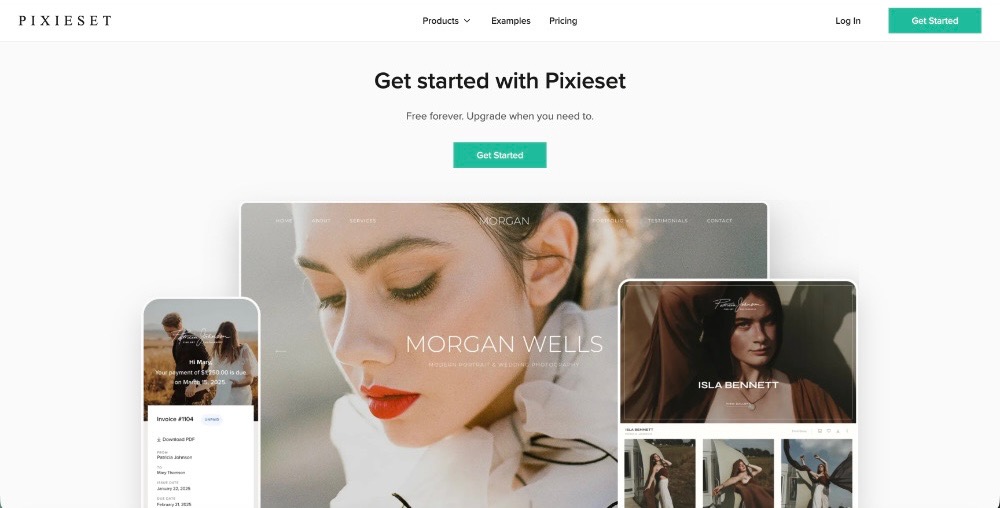
Pixieset allows photographers to customize things like gallery covers, typography, color schemes, and grid layouts. You can save frequently used design choices as collection presets. This is helpful if you want galleries to have a consistent look without rebuilding everything each time.
Personally, one of the things I love about Pixieset is how clean it looks. I don’t want a busy gallery design competing with the actual photos.
Before sending yours, open it and look at it like a client would. Does the cover image make sense? Is it easy to tell where to go next? Does everything feel connected to your brand? Don’t worry about adding too much, a simple layout can often make everything feel more streamlined.
Organize Your Gallery With Your Clients in Mind
When you are setting up a photography gallery, an important distinction to keep in mind is that clients don’t know your workflow inside and out the same way that you do.
Pixieset organizes galleries into collections, and you can use photo sets within a collection to divide images into smaller groups. How you use those tools will depend on the type of session you photograph. You really want to aim to have the organization of the gallery make sense to the person receiving it.
Before sending the gallery, click through the whole thing yourself. Look for anything that could make a client stop and wonder what they’re supposed to do. If the gallery requires a long explanation prior to even being opened, it might be worth it to simplify first.
Make Viewing, Downloading, and Sharing Photos Simple
After putting so much time and effort into making the booking and actual photography part of your workflow simple, downloading and sharing photos should feel just as easy for your clients.
Pixieset gives photographers control over gallery downloads, including whether downloads are available and which file sizes clients can access. You can also use options such as collection passwords and download PINs when you want more control over access.
Clients can download individual images or, when you’ve enabled the option, download the full gallery.
Pixieset also gives you several ways to share a collection. You can send a gallery by email, copy a direct link, use a QR code, or create a Quick Share link when you only want to send specific photos.
One thing to keep in mind would be to only set up the options that your clients actually need. Then make sure your delivery email tells them anything they need to know, especially if there’s a password or download PIN involved.
Your photography gallery should make getting the photos the easy part.
Use Favorites to Make Choosing Photos Easier
If you need clients to choose images after a session, Pixieset Favorites can save you from a long string of emails that basically say, “Wait, which photo did you mean?”
Clients can click the heart icon on photos and organize their selections into Favorite Lists. On the photographer end, you can also create preset lists with selection limits, which can be useful when a client needs to choose a specific number of images.
You can allow notes on favorites too, so clients can leave feedback tied to a particular photo rather than trying to describe it separately.
For photographers, Pixieset lets you review those lists and work with the selected filenames. Clients can also share a Favorite List, and if downloads are enabled, download the images in that list.
If selections are part of your workflow, keeping them connected to the photography gallery can make the process much easier to follow.

Make Print Ordering Part of the Photography Gallery Experience
Using Pixieset has many perks, and one of my favorites is that it’s easy to sell prints and products to clients right from their galleries.
When Store is enabled for a collection, photographers can offer printed products and digital downloads through the gallery. Pixieset also supports automatic fulfillment through professional print lab partners in supported locations.
For the client, that means they can look at a photo they love and order it without having to download the file, leave the gallery, find another printing website, upload the image again, and start from scratch.
As a photographer, you can choose what you sell and set up your own price sheets.
You can also create store coupons, including percentage discounts, fixed-dollar discounts, free products, or free shipping offers. Pixieset lets you display applicable coupon information in a collection or include a coupon in a gallery email.
If print sales are a part of your business, let the photography gallery do some of that work for you instead of having your clients hunt for them.
Add the Finishing Touches Before You Send Your Gallery
It can be so tempting to hit send the second the gallery is finished, but give yourself a few extra minutes before you do so!
Prior to delivering a finished photography gallery, go through it from your client’s point of view. You don’t need some enormous 47-step checklist, just check the details that could affect their experience.
I’d look at things like:
- Is the correct cover image showing?
- Are the photos and photo sets where they belong?
- Are your download settings correct?
- Do the password and PIN settings match what you plan to send the client?
- Are Favorites set up the way you want them?
- Is your Store turned on if clients should be able to order products?
- Are your prices, products, and any active coupons correct?
- Does your delivery email include the information the client needs?
Then preview the gallery one last time.
Click around, try the important buttons, and look at what your client is about to receive. Those few minutes can catch a surprising number of little things before your client ever sees them.
Your photography gallery is just one part of your overall client experience. Want to make the whole process easier? Check out my photography workflow blog, where I walk through my process from the first inquiry to final gallery delivery and follow-up.

A Better Photography Gallery Can Be a Pretty Simple Change
Creating a better photography gallery doesn’t mean adding every feature you can find.
Start with imagining yourself as the client.
Give them a gallery that feels connected to your brand and is easy to navigate. It should make downloading straightforward, give them a simple way to choose favorites, and let them order prints without jumping through hoops.
That’s why Pixieset has stayed in my photography toolkit. I love the clean galleries and the way clients can view their images and order prints and products in one place. If you want to give it a try, you can use my Pixieset referral link to sign up and get a $20 credit toward a paid plan.
If you’re looking for more of the tools I use in my photography business, head over to my For Photographers page! I’ve gathered the programs and resources I actually use there, along with mentoring and more tips from what I’ve learned since starting my business in 2009. If you’d like to keep up with what I’m working on, come follow along on Instagram!
At the end of the day, your photography gallery doesn’t need to be complicated. A few thoughtful choices can make it easier for your clients to enjoy their photos, share them with the people they love, and order the ones they want to see in print.
And that’s really the goal, right? You’ve already put so much care into creating the photos. Taking a little extra time with how you deliver them helps make the whole experience feel complete.
Tools I Use For My Own Business:
- Photo Mechanic makes culling through a big batch of photos much faster, helping me sort, select, and organize my images before I start editing.
- Imagen AI helps speed up my editing workflow by learning my editing style and applying it across my photos. This gives me a consistent starting point while saving me SO much time.
- Dubsado keeps my client workflow organized from the first inquiry through booking, payments, and beyond, while its automations save me so much time behind the scenes. Use my link above to get 20% off your first month or year!
- Flodesk makes email marketing feel simple, from creating beautiful emails and opt-in forms to setting up automated workflows that keep me connected with my audience. My link gets you 50% off your first year!


